Your own data collection: arrays
Store recent prices in an array of limited size and follow the order of its elements.
Series stores history associated with candles. Sometimes, however, you want to decide which values a program collects, in what order, and when to remove them. You can use an array for this.
What does an array store?
An array consists of elements in sequence. Every element has an index; the first index is zero.
An array stores elements of the same type. For example, you can have an array of numbers or an array of text, but we do not put text in a numeric array. Having the same type does not mean having the same value: 100, 103, and 101 are different numbers in the same array.
If you put 100, 103, and 101 into an array in that order, element 0 is 100, element 1 is 103, and element 2 is 101. The index identifies a storage position here. It does not automatically mean a value that many candles ago.
close[1] is the previous candle’s closing price. array.get(prices, 1) is the second element of prices. The element’s age depends on how you filled the array.
The array namespace
array.new_float(0) creates an initially empty numeric array. Zero is the initial number of elements, not an initial price.
| Operation | Purpose |
|---|---|
array.push(prices, close) | Adds an element at the end |
array.size(prices) | Returns the number of elements |
array.shift(prices) | Removes and returns the first element |
array.get(prices, 0) | Reads the first element |
array.avg(prices) | Averages the stored numbers |
The index in array.get must refer to an existing element. For an array of three elements, 0, 1, and 2 are valid; 3 is not.
Store five recent prices
Create recent_prices.py:
"""
@pyne edge
"""
from pynecore import Persistent
from pynecore.lib import array, close, color, plot, script, ta


@script.indicator("Recent Prices", overlay=True)
def main():
    prices: Persistent[list[float]] = array.new_float(0)
    array.push(prices, close)
    if array.size(prices) > 5:
        array.shift(prices)
    stored_average = array.avg(prices)
    full_average = ta.sma(close, 5)
    plot(stored_average, "Stored average", color=color.blue, linewidth=2)
    plot(full_average, "SMA 5", color=color.orange)
The list[float] annotation is the type of an array storing numbers. Persistent keeps the array available on the next candle too. We do not create it again on every candle.
We perform array operations through the array namespace. We do not need to import a general Python library or write our own list literal.
If you already know Python: in PyneCore’s Python runtime, a Python list stores the array. This is also why its type includes list[float]. Elements must match the array’s specified element type; unlike a general Python list, we do not mix numbers and text here.
In a program marked @pyne that uses Python’s features, you can also use the list’s own operations: prices.append(close) adds an element, for example, and prices.pop(0) removes the first one. In this book’s @pyne edge programs, we use array.push and array.shift for these operations. In Edge, we also use array.get(prices, 0) instead of reading prices[0] directly, and create an array with a call such as array.new_float(0), not the [] list literal.
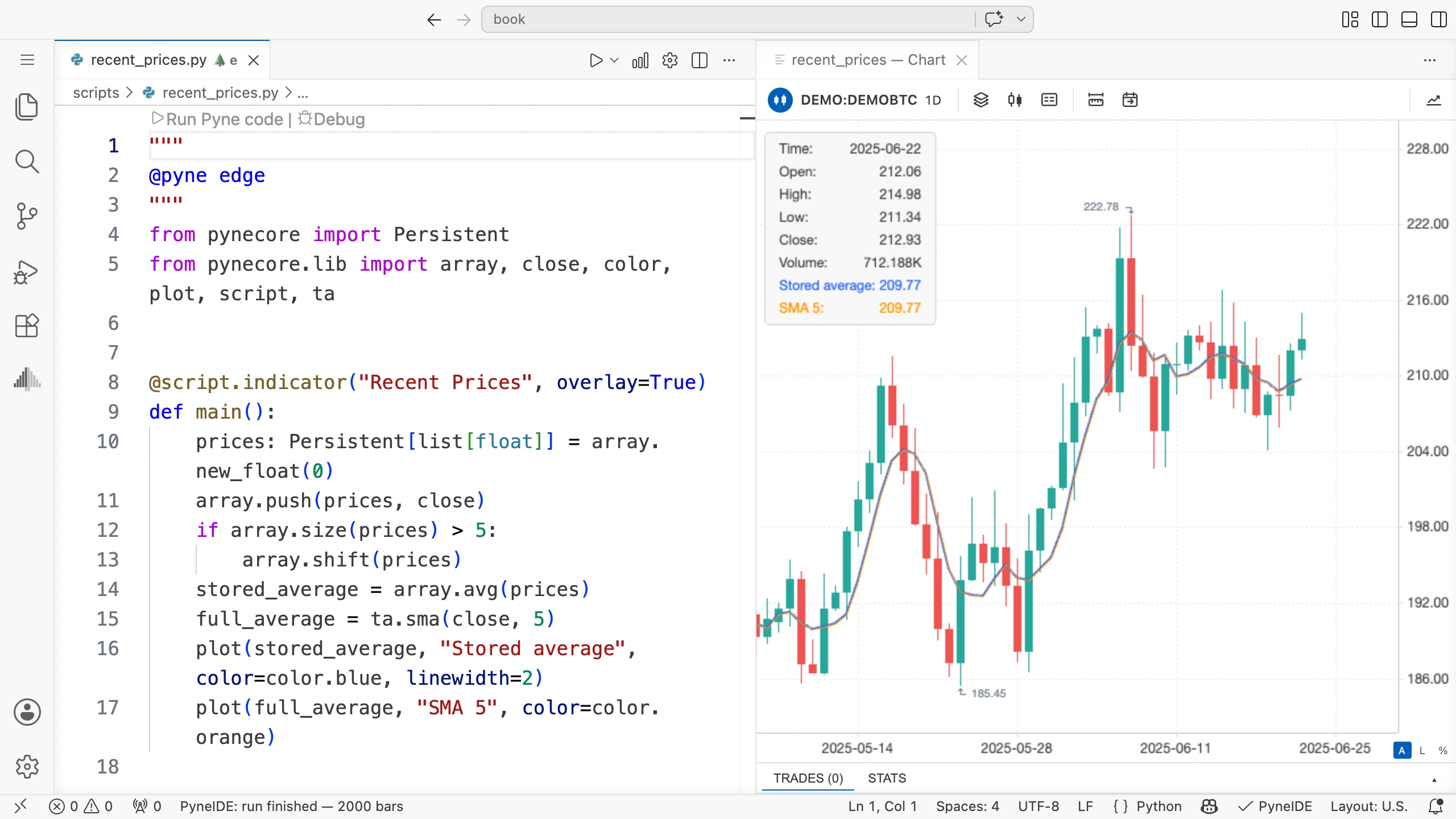
Run it on the demo data. The blue line plots the average of the prices collected so far. It contains one price on the first candle, two on the second, then three and four. From the fifth candle onward, five elements remain.
The order of adding and removing
On the sixth candle, we first add the sixth close. The array now has six elements. The if condition is true, so we remove the first, oldest element. By the time we calculate the average, it contains only the five closing prices from candles two through six.
In this program, the start of the array is the oldest retained price, and the end is the newest. Once there are five elements, array.get(prices, 0) therefore returns the price from four candles earlier. It is not the current price.
To read the newest price, the last index is array.size(prices) - 1. The element count and last index differ by one because indexing starts at zero.
Partial and complete windows
The two plotted averages behave differently at first. The array’s average can be calculated from the prices actually collected, even when there are four or fewer. ta.sma(close, 5) returns a value only with a complete five-element window.
From the fifth candle onward, they average the same five closing prices. From there, the two lines should agree within the precision of numerical representation.
An array-based average therefore does not automatically replace the built-in moving average. You need to define the rule for the initial window yourself.
Why limit the size?
If you only add one element on each candle, the array grows with the data length. At the end of the run, it would store every processed closing price.
Here, we need the last five prices, so we remove older elements. The collection therefore holds at most five values at calculation time. In a real collection task, also define which data you need to keep and for how long.
Try it yourself
Change the program so the array keeps three prices. Change the built-in SMA’s length to three too. Then plot the oldest retained array element as a third line.
Solution
The removal condition:
if array.size(prices) > 3:
    array.shift(prices)
The built-in average and the new line:
full_average = ta.sma(close, 3)
oldest_price = array.get(prices, 0)
plot(oldest_price, "Oldest stored price", color=color.gray)
array.push runs before the read on every candle, so the array has at least one element at that point. After it has grown to three elements, the oldest price is from two candles earlier.
Write out the array
With three retained elements instead of five and the price sequence 100, 103, 101, 105, write down the array’s contents after each of the four candles. On the fourth candle, it should contain 103, 101, and 105, in that order.