Your own functions
Break code into named calculations and reuse them in several places.
You already know how to calculate a candle’s size: high - low. If you need it in several calculations, you can put it in your own function. The call can show the calculation’s purpose, and you can keep the formula in one place.
A function’s inputs and result
def price_range(top: float, bottom: float) -> float:
    return top - bottom
def defines a function. Its name is price_range. It expects two inputs, top and bottom. Both are numbers that can have fractional parts.
-> float specifies the result’s type. return calculates and returns the result, then ends that function call.
The result of price_range(105, 100) is 5. The function does not know whether these values are prices, and does not choose a candle. The caller provides both values.
The function body starts four spaces farther in. In this example, the definition sits beside main(), at the file’s outermost level. We therefore pass the two prices needed for the calculation as parameters. You can also create a function inside main(); we try that below too.
A name’s scope
top and bottom are parameters available only inside price_range. main() cannot refer to them directly. There, you use the returned result.
A name’s scope means the part of the code where it is available. Two separate functions can use the same parameter names without their parameters becoming a single shared variable.
The price_range function defined at the file’s outermost level does not automatically have access to the local variables of main(). It can, however, use names imported at the start of the file, such as close. Where you define a function therefore also affects visibility.
A function’s definition and its call are different too. The definition supplies the rule; a call executes it with specific values.
The complete program
Create price_functions.py. The same function calculates the candle’s full range and the signed change from its opening to closing price:
"""
@pyne edge
"""
from pynecore.lib import close, color, high, low, open, plot, script


def price_range(top: float, bottom: float) -> float:
    return top - bottom


@script.indicator("Price Functions", overlay=False)
def main():
    full_range = price_range(high, low)
    body_change = price_range(close, open)
    plot(full_range, "Full range", color=color.blue)
    plot(body_change, "Body change", color=color.orange)
Run it on the demo data. The full range is not negative because a candle’s high is at least as large as its low. The change between the opening and closing prices can be negative. The function does not change the prices passed to it; it returns their difference.
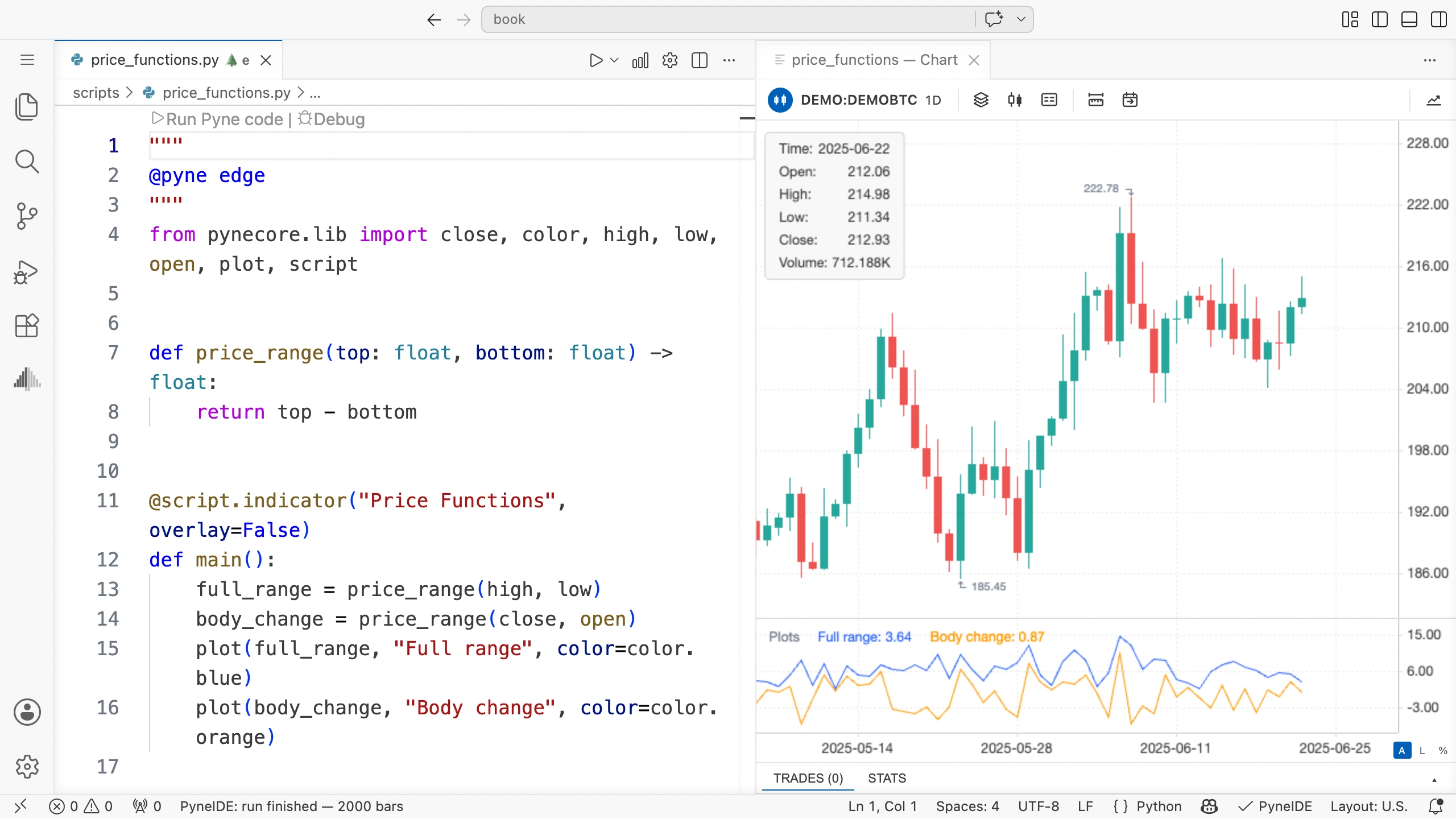
This function is short and easy to check by hand. In a larger program, you can also give names to more complex subtasks, but you do not have to put every single addition in a separate function.
Parameter order
The call price_range(high, low) passes high to top and low to bottom. Swapping them reverses the subtraction’s sign.
You can also specify parameter names:
full_range = price_range(top=high, bottom=low)This is longer, but can make a more complex call easier to read. The name must match the function parameter’s name exactly.
A function inside main()
A function defined inside another function can access the surrounding function’s variables too. This is useful, for example, when several calculations use the same input setting.
Let us smooth the previous program’s two lines with a moving average. We specify the average length in one input and use it for both calculations. We pass only the two prices to the inner function; it finds the length among the parameters of main().
In price_functions.py, keep the outer price_range function and the indicator decorator. Add input and ta to the pynecore.lib import, then replace the definition of main() with:
def main(
    length: int = input.int(5, title="Average length", minval=1, maxval=200),
):
    def average_difference(top: float, bottom: float) -> float:
        return ta.sma(price_range(top, bottom), length)

    average_range = average_difference(high, low)
    average_body_change = average_difference(close, open)
    plot(average_range, "Average range", color=color.blue)
    plot(average_body_change, "Average body change", color=color.orange)
length is the integer input introduced earlier. The inner average_difference receives two parameters: the call supplies top and bottom. It reads length from the surrounding main() function, so you do not need to pass it again in the calls.
The inner function’s definition begins with four spaces because it belongs to main(). Its own body, the return line, begins with eight. You can use average_difference inside main(); it does not become available at the file’s outermost level.
price_range calculates the difference between the two prices, and ta.sma returns its moving average. The blue line therefore shows the average full candle range; the orange line shows the average signed change between the opening and closing prices. Both calls run on every candle, so both averages are calculated continuously.
Run the modified program, then use the gear icon to open Inputs. Change Average length from 5 to 20 and click Save. The open chart recalculates automatically, and both lines switch to twenty-candle averages. You did not need to change the inner function’s two calls. Setting the length to 1 gives you the original program’s two lines again.
This access to surrounding variables is called a closure. Reading a value does not mean an assignment inside the inner function automatically overwrites the outer variable. In this example, we only read length.
If you read code translated from Pine Script: PyneComp creates functions inside main(). Variables declared at the top level in Pine Script also go inside main(), so the inner functions can access them. This is why translated code has this layout. When writing your own Pyne code, you can use both approaches: a separate function receiving parameters or an inner function that can also access surrounding variables.
With the parameter-based version, the call shows every passed value, and you can easily use the same function with another pair of prices. An inner function can be convenient when several calculations depend on the same variables created in main().
Your own function can have state too
price_range calculates only from the values it receives. It has no variable retained between candles and uses no history. You can therefore call it with two values at any time.
The average_difference above does use state because its ta.sma call calculates from earlier values. You can also create Persistent or Series variables directly inside your own function.
An event-counting function
Let us count rising and falling candles separately. We write a function that receives a Boolean value and remembers how many times it has received true so far.
Import Persistent at the start of the file:
from pynecore import PersistentWrite this function before main(), at the file’s outermost level:
def count_events(event: bool) -> int:
    count: Persistent[int] = 0
    if event:
        count += 1
    return count
count starts at zero. When event is true, it increases by one; when false, it retains its value. return returns the running total in either case. After the function call ends, the Persistent variable keeps its value for the next call.
Keep overlay=False. Replace the previous definition and body of main() with:
def main():
    bullish_count = count_events(close > open)
    bearish_count = count_events(close < open)
    plot(bullish_count, "Bullish count", color=color.green)
    plot(bearish_count, "Bearish count", color=color.red)
We call the same function from two separate places in the code. The two call sites have separate count states: the first counts rising candles and the second falling candles. The first call does not increase the second call’s counter.
For example, if the first four candles occur in this order, you get these values:
| Candle | Relationship between open and close | bullish_count | bearish_count |
|---|---|---|---|
| First | Close is higher | 1 | 0 |
| Second | Close is lower | 1 | 1 |
| Third | Both prices are equal | 1 | 1 |
| Fourth | Close is higher | 2 | 1 |
Run it on the demo data. The green line steps up only on rising candles, and the red line only on falling candles. A new run builds both counters from zero.
Both function calls run on every candle; the condition for increasing the count is inside the function. For a stateful function, call order and frequency are part of its behavior. If you call a function on only some candles, the history it maintains advances only on those calls too.
If you need one shared counter, call the function once and use the variable holding its result in several places. A second call site means another, separate counter.
Several statements in a function
If the result needs an intermediate value, you can calculate it before return:
def midpoint(top: float, bottom: float) -> float:
    total = top + bottom
    return total / 2
total is a local variable. It does not become a variable in main() when the call ends. We only return the function’s result.
Try it yourself
Add a midpoint function to the program, then create an overlay indicator that plots the candles’ midpoints. Use the function’s top and bottom parameters to receive the high and low.
Solution
Put the midpoint definition above before main(). Set overlay=True in the indicator decorator and use this body:
center = midpoint(high, low)
plot(center, "Midpoint", color=color.blue, linewidth=2)
You can remove the calculations and plots for the previous two lines from this version. Remove unused imports too.
Explain the call
For price_range(close, open), explain which value goes into which parameter, what happens on the return line, and where main() receives the result. You can follow these three steps for a longer function call too.