Advanced: your own types and methods
Organize related data in your own type and create an operation that works with it.
So far, the programs have stored prices, counters, and settings in separate variables. This lets you build many kinds of indicators and strategies. In a larger program, however, it can help to treat several related values as one unit: for example, the two boundaries of a price band, or a signal’s price and time.
This is the purpose of a user-defined type, or UDT. A method is an operation associated with a particular type. Both are part of Pyne code, but you do not need to use them for the book’s later examples. If you want to reach strategies first, you can move on to debugging and return here later.
Related data in one type
Two numbers describe a price range: its lower and upper boundaries. A custom type lets us give this pair of values a name:
@udt
class PriceRange:
    bottom: float = 0.0
    top: float = 0.0
class defines a new type named PriceRange. bottom and top are the type’s fields. Both can store fractional values, and their defaults are zero.
The @udt annotation makes this a Pyne user-defined type. We import udt from pynecore.core.pine_udt. In Edge, we write fields inside the type definition and define its methods separately. We do not use inheritance within this language subset.
The type and an object created from it
The type describes which values we store together. A specific pair of values is held by an object, also called an instance, created from the type:
current_range = PriceRange()
current_range.bottom = low
current_range.top = high
PriceRange() creates a new instance with the fields’ default values. The next two lines set its lower boundary to the current candle’s low and its upper boundary to the high. You can read its fields as current_range.bottom and current_range.top. The dot accesses a field here.
You can create several objects from the same type. Another PriceRange can store a different range, for example; the field names are the same, but their values are independent.
A method: an operation on a particular type
The midpoint of a price range is the average of its two boundaries. We can write this as a method associated with the type:
@method
def midpoint(self: PriceRange) -> float:
    return (self.bottom + self.top) / 2
@method marks the function as a method. The first parameter’s type specifies what data it works on: here, a PriceRange object. Within the method, self is the name of the object whose midpoint we want to calculate. It is a parameter name; the PriceRange annotation specifies its type.
The definition sits outside the class block, at the file’s outermost level. We import method from pynecore.core.pine_method.
The call:
center = midpoint(current_range)We call the known method by its name and pass the object it works on as the first argument. The self parameter therefore receives current_range. The returned number goes into center.
You could write this calculation as an ordinary function too. A method helps organize a program when you have several operations associated with a particular type and want to make it clear what data they work on.
The complete program
Create udt_ranges.py in the Scripts group:
"""
@pyne edge
"""
from pynecore.core.pine_method import method
from pynecore.core.pine_udt import udt
from pynecore.lib import color, high, low, plot, script


@udt
class PriceRange:
    bottom: float = 0.0
    top: float = 0.0


@method
def midpoint(self: PriceRange) -> float:
    return (self.bottom + self.top) / 2


@script.indicator("Price Range Objects", overlay=True)
def main():
    current_range = PriceRange()
    current_range.bottom = low
    current_range.top = high
    center = midpoint(current_range)
    plot(current_range.bottom, "Lower", color=color.blue)
    plot(current_range.top, "Upper", color=color.orange)
    plot(center, "Midpoint", color=color.green, linewidth=2)
Run it on the demo data. The blue line shows the candles’ lows, the orange line their highs, and the green line the midpoint between them. On every candle, the green point lies between the other two values.
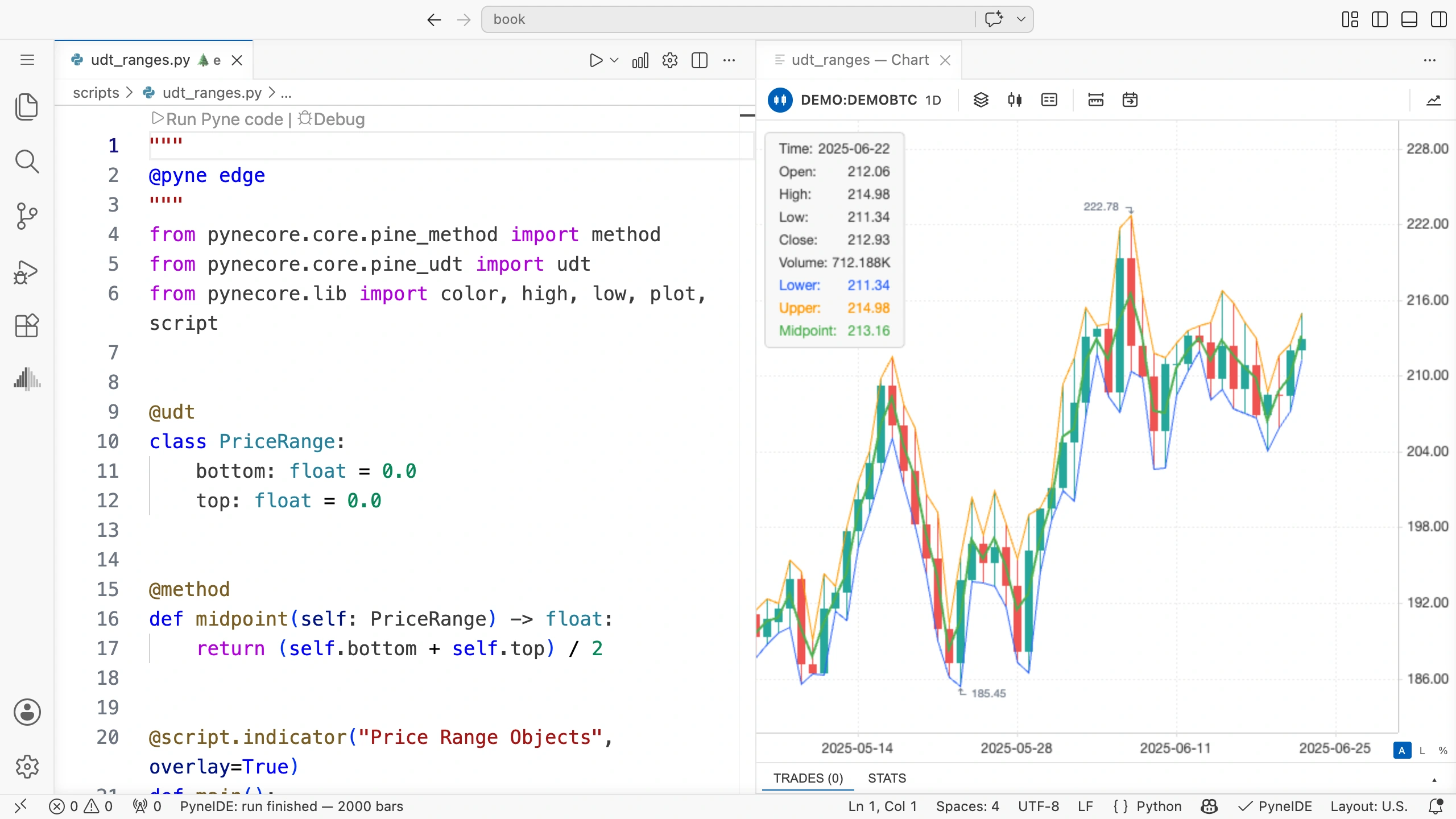
The program creates a new PriceRange object on every candle. In this example, the fields do not retain the previous candle’s values; they always store the current candle’s two boundaries.
Assignment and copying
Assigning an object to another variable is not the same as copying it:
other_range = current_range
other_range.top = other_range.top + 1.0
Both variables refer to the same object. The second line therefore also changes current_range.top.
If you want a separate instance with the same field values, create a new object:
other_range = PriceRange()
other_range.bottom = current_range.bottom
other_range.top = current_range.top
other_range.top = other_range.top + 1.0
For this type containing two numbers, changing the new instance’s upper boundary does not affect the original. We store the two numbers in separate objects. If a field later holds another object or an array, assigning that field to a new instance also passes a reference and does not separately copy its contents.
Retain an object between candles
To keep using the same object, you can apply the Persistent annotation learned earlier. Import Persistent from pynecore for this.
current_range: Persistent[PriceRange] = PriceRange()
current_range.bottom = low
current_range.top = high
The object is created once, and we update its two fields on every candle. You can replace the object creation and the two field assignments at the start of main() with these three lines. The midpoint calculation and plotting stay the same.
In this example, the chart does not change because we assign the same field values. In another task, you might change fields only at an event, retaining a previously selected price range, for example. The type alone does not make an object persistent.
Try it yourself
Create a method named width that returns the price range’s width. Following the midpoint example, give it a self: PriceRange parameter and calculate the result from the two fields.
Solution
@method
def width(self: PriceRange) -> float:
    return self.top - self.bottom
Call it inside main():
range_width = width(current_range)If a candle’s high is 108 and its low is 101, its width is 7. The method only reads the fields; it does not change either boundary.