Debugging in PyneIDE
Pause a program at a breakpoint and check its variables candle by candle.
Code can be valid yet calculate a different result from the one you want. The debugger lets you pause execution, inspect variables, and follow statements one by one.
In this chapter, you examine the distance between the closing price and a length-five moving average. First you predict the result, then look at what the program calculated.
Three kinds of errors
A syntax error breaks the code’s writing rules. Examples include a missing colon or incorrect indentation. The editor often reports these while you type.
A runtime error occurs while the program executes. For example, you read an array index with no element at that position. The run may stop with an error message.
A program with a logic error may still run. If the code uses average - close instead of close - average, the result’s sign is reversed. The language’s rules do not prohibit this, so you need to compare the result with the task.
Visual Studio Code’s View → Problems view lists the issues reported by the editor. Click a row to jump to the problem. Read the detailed error message before changing several lines.
A program to inspect
Create debug_average.py:
"""
@pyne edge
"""
from pynecore import Series
from pynecore.lib import bar_index, close, color, log, plot, script, ta


@script.indicator("Average Distance", overlay=False)
def main():
    average: Series[float] = ta.sma(close, 5)
    gap = close - average
    if bar_index == 10:
        log.info("close={0}, average={1}, gap={2}", close, average, gap)
    plot(gap, "Distance", color=color.blue)
bar_index is the index of the candle being processed and starts at zero. Index 10 is the eleventh candle. The logging call therefore writes only once in this historical run.
log.info creates a formatted message. The three values provided after the text replace {0}, {1}, and {2} in that order. The logger processes the text containing these numbered placeholders.
Run the program once with Run Pyne code. The line should be positive when the close is above the average. Both the average and the distance are missing on the first four candles.
Pause before a particular line
- Click to the left of the line number beside
plot(gap, ...). A breakpoint marker appears. - Click Debug above the code.
- If a data picker appears, choose
demo. - The program pauses at the breakpoint. Open the Run and Debug view.
A breakpoint is a place where the debugger pauses the program. The highlighted line has not run yet. You can already examine the results of assignments before that line.
The first pause may be on the first candle. There, gap is missing because there is no complete five-candle window. The debugger shows that situation; a missing value alone is not a program error.
Reach a candle after warmup
On the floating toolbar shown during debugging, PyneIDE’s Next Bar button moves to the next candle. Hover over an icon to read its name. Find Run to Bar…, click it, enter 10 in the field that appears, and press Enter.
The eleventh candle has a complete length-five averaging window. Find average and gap in the Variables list. In the Pyne group, you can check the processed candle’s data, including bar_index and close.
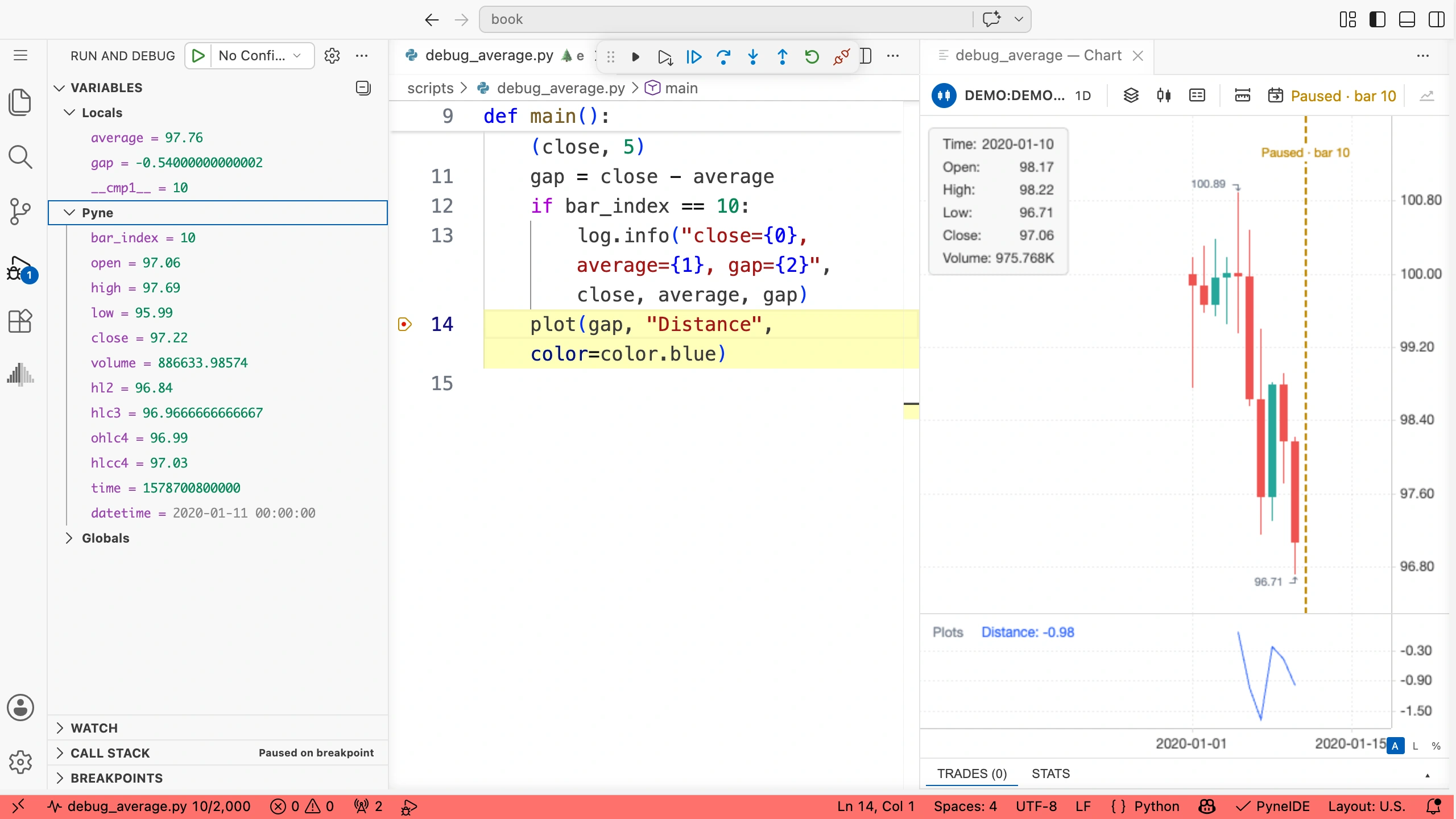
average is a Series variable, so your program can also use its previous value through average[1]. The previous candle’s average is not necessarily the same as the current one, because the window has moved forward one candle.
Watch expressions
In Watch, you can add expressions you want to see whenever execution pauses. Try:
close
close[1]
average
close - average
close[1] is the closing price before the paused candle. average is your own variable. The result of close - average should match the already calculated gap.
Watch variables and simple calculations. Do not put a ta.sma call, an order-sending operation, or an array-changing call in Watch. Debugging checks should not change the program’s state.
Step by line and by candle
Step Over moves to the next statement without entering the details of a called function. Step Into can enter your own function. Continue resumes execution until the next pause. Disconnect ends the debugging connection and finishes debugging.
Next Bar operates at a different scale: it takes you to a following candle. Stepping by line shows one candle’s calculation in detail; stepping by candle shows how the result changes over time.
The paused candle has not finished processing, so the chart may show an earlier completed state. Check the current candle’s index and data in the Pyne group.
Before reading a variable, check the highlighted line. If the assignment is still ahead, the variable does not yet contain the result you expect now.
Find a sign error
Stop the debugger. Change this line:
gap = average - closeRestart debugging and go to the same candle. If the price is above the average, gap will be negative, even though the task asked for a positive distance.
In Watch, close - average still shows the original, intended direction. Comparing the two values immediately reveals the difference. Restore the correct subtraction and check the same candle again.
Try it yourself
Add a variable previous_close = close[1] to the program and inspect it in the debugger. At candle index 10, which candle index’s closing price should it contain? What is its value on the very first candle?
Solution
previous_close = close[1]On candle 10, it returns candle 9’s closing price. On the first candle, index 0, it is missing because there is no earlier candle in the data file.
Put the line before the breakpoint so it has run when execution pauses. After checking, you can remove the helper variable and the log line used only for inspection.
A useful bug report
When asking for help, include the file, the data used, the actual inputs, and the time of the candle you are examining. Give both the expected and actual values. Instead of “the line is wrong,” say, for example: “on this candle, the close is 101 and the average is 100, but the distance is −1.” That makes the calculation possible to check.