进阶:自定义类型与方法
将相关数据组织进自定义类型,并为它编写操作。
此前程序将价格、计数和设置分别存入不同变量。这样已经能编写很多指标与策略。但程序变大时,可能更适合把相关数据作为整体处理,例如价格区间的上下界,或信号的价格与时间。
这正是用户自定义类型的作用,英文为 user-defined type,简称 UDT。方法则是与某一类型相关的操作。两者都属于 Pyne code,但并不是后续示例的必备内容。如果想先学到策略,可以继续调试章节,以后再回来。
将相关数据放入一个类型
一个价格区间可以用下界和上界两个数描述。自定义类型能给这组数据命名:
@udt
class PriceRange:
    bottom: float = 0.0
    top: float = 0.0
class 定义新类型,名称为 PriceRange。bottom 和 top 是类型的字段,都可以保存小数,默认值为零。
@udt 将它标记为 Pyne 用户类型。udt 从 pynecore.core.pine_udt 导入。在 Edge 中,类型定义内部写字段,相关方法另行定义。这一语言范围不使用继承。
类型与其创建的对象
类型描述哪些数据放在一起。具体数据由该类型创建出的对象,也称实例保存:
current_range = PriceRange()
current_range.bottom = low
current_range.top = high
PriceRange() 用默认字段值创建新实例。后两行把下界设为当前最低价,上界设为最高价。通过 current_range.bottom 和 current_range.top 可以读取字段,点号表示字段访问。
同一类型可以创建多个对象。例如另一个 PriceRange 可存储不同区间。字段名称相同,值却独立。
方法:针对某种类型的操作
区间中点是上下界的平均值,可以写成该类型的方法:
@method
def midpoint(self: PriceRange) -> float:
    return (self.bottom + self.top) / 2
@method 将函数标记为方法。第一个参数的类型决定操作什么数据:此处是 PriceRange 对象。self 是方法内部对当前对象的称呼,我们要计算它的中点。它只是参数名,类型由 PriceRange 指定。
定义位于 class 块之外、文件最外层。method 从 pynecore.core.pine_method 导入。
调用方式:
center = midpoint(current_range)已知方法可以通过名称直接调用,并将要操作的对象作为第一个实参。self 因此收到 current_range,返回的数字放入 center。
也可以用普通函数写同样计算。当你有多项针对同一类型的操作,想明确它们操作什么数据时,方法有助于组织代码。
完整程序
在 Scripts 分组创建 udt_ranges.py:
"""
@pyne edge
"""
from pynecore.core.pine_method import method
from pynecore.core.pine_udt import udt
from pynecore.lib import color, high, low, plot, script


@udt
class PriceRange:
    bottom: float = 0.0
    top: float = 0.0


@method
def midpoint(self: PriceRange) -> float:
    return (self.bottom + self.top) / 2


@script.indicator("Price Range Objects", overlay=True)
def main():
    current_range = PriceRange()
    current_range.bottom = low
    current_range.top = high
    center = midpoint(current_range)
    plot(current_range.bottom, "Lower", color=color.blue)
    plot(current_range.top, "Upper", color=color.orange)
    plot(center, "Midpoint", color=color.green, linewidth=2)
用演示数据运行。蓝线显示最低价,橙线显示最高价,绿线显示中点。每根 K 线的绿点都在另两个值之间。
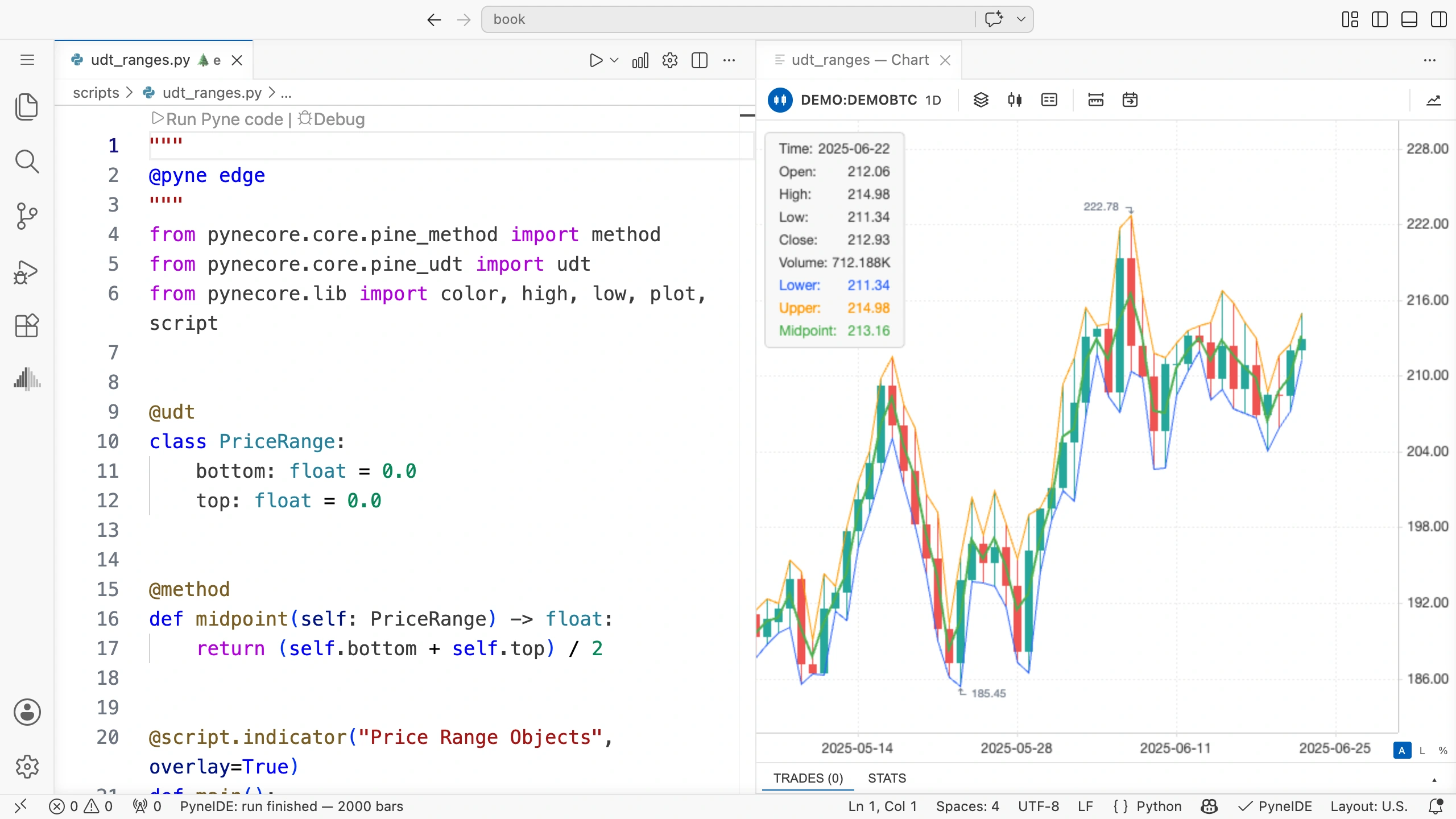
程序每根 K 线都创建新的 PriceRange。本例字段不保留上一根值,始终存当前两条边界。
赋值与复制
将对象赋给另一个变量,并不等于复制对象:
other_range = current_range
other_range.top = other_range.top + 1.0
两个变量引用同一对象,所以第二行也会改变 current_range.top。
若要一个字段值相同但独立的实例,需要新建对象:
other_range = PriceRange()
other_range.bottom = current_range.bottom
other_range.top = current_range.top
other_range.top = other_range.top + 1.0
本例类型只有两个数,修改新实例上界不会影响原对象,因为两个数存于不同对象。以后如果字段保存的是另一个对象或数组,把该字段赋给新实例同样只传递引用,不会独立复制其内容。
跨 K 线保留对象
若想继续使用同一对象,可以加上此前学过的 Persistent 标记。为此,从 pynecore 导入 Persistent。
current_range: Persistent[PriceRange] = PriceRange()
current_range.bottom = low
current_range.top = high
对象只创建一次,两个字段每根更新。可以用这三行替换 main() 开头的创建及两次字段赋值,中点计算和绘图不变。
本例图表不会因此改变,因为设置的字段值相同。在其他任务中,可以只在事件发生时更新字段,从而保留此前选定的价格区间。类型本身不会让对象自动持久化。
自己试一试
创建名为 width 的方法,返回区间宽度。仿照 midpoint 使用 self: PriceRange 参数,根据两个字段计算。
参考答案
@method
def width(self: PriceRange) -> float:
    return self.top - self.bottom
在 main() 中调用:
range_width = width(current_range)若最高价为 108、最低价为 101,宽度为 7。方法只读取字段,不修改任何边界。